
Case Study • Payroll Processing • Ride-Share Driver Payroll
Two days of hand-copying. Gone. Fifteen minutes, start to finish.
A system to pay drivers of a ride-share company, replacing a two-day manual process with a fifteen-minute automated run each pay period, delivered September 2024.
The Challenge: How do you turn a raw list of pay period routes into accurate pay for a dozen different drivers? By hand, one row at a time.
Every pay period, the client received a CSV export of every route her drivers ran: hundreds of rows, no organization by driver, no pay calculated. She hand-copied each route into a new workbook, sorted it by driver, calculated pay row by row, factored in special pricing for specific route-and-driver combinations, tallied what the company owed and what it would collect back. After all that, she then wrote and sent a pay-summary email to every driver herself.
The bottom line: Two days of work, and still just hoping the pricing was right.
Structured
One recursive formula rebuilds the entire multi-driver report from a single Table of raw rides — no manual sorting, ever.
Automated
Tables with special-cased route/driver rates and per-mile surcharges for long trips allow exceptions to be priced as easily as standard routes.
Tailored
Updated a year after launch to send pay-summary emails through Gmail instead of Outlook — proof it’s still in daily use.
How I Built It
What data is needed?
Primary Data
Route Export
Every route a driver ran that pay period — driver, vehicle, date, time, stops, passengers, miles, and completion status — straight from a raw CSV extract.
Metadata
Rates and Exceptions
A base pay rate, a reduced no-show rate, a per-mile rate for longer routes, and a table of route/driver-specific rate exceptions for the handful of jobs priced differently.
Where does it come from?
Primary Data x Metadata
One Import, One Table
Power Query cross references the pay-period CSV with the rates tables, and the resulting import table shows the amount paid for and paid out on each route — with all exceptions and rules incorporated automatically.
Metadata
Exceptions, Handled Identically
Route/driver combinations are added with ease and automatically incorporate into the import alongside standard rates — no additional work required by the user.
What do you need to do with it?
Reports
Instant, Recursive Payroll Reports
One LAMBDA formula displays a single driver’s rides and totals their pay; a second, recursive LAMBDA calls it once per driver, stacking every driver’s trips into one report automatically. A fully formatted PDF of that same output is generated with a single click, ready to send.
Automated Communication
Pay Summaries, Sent Automatically
A second button emails every driver their own pay summary, using a template the client controls — rewritten in 2025 to run through Gmail instead of Outlook, at the client’s request.
Dashboards
Company Reimbursement, Tracked Too
Net pay, insurance fees, and company reimbursement are all calculated per ride, giving the owner a real profit picture, not just a payroll number.
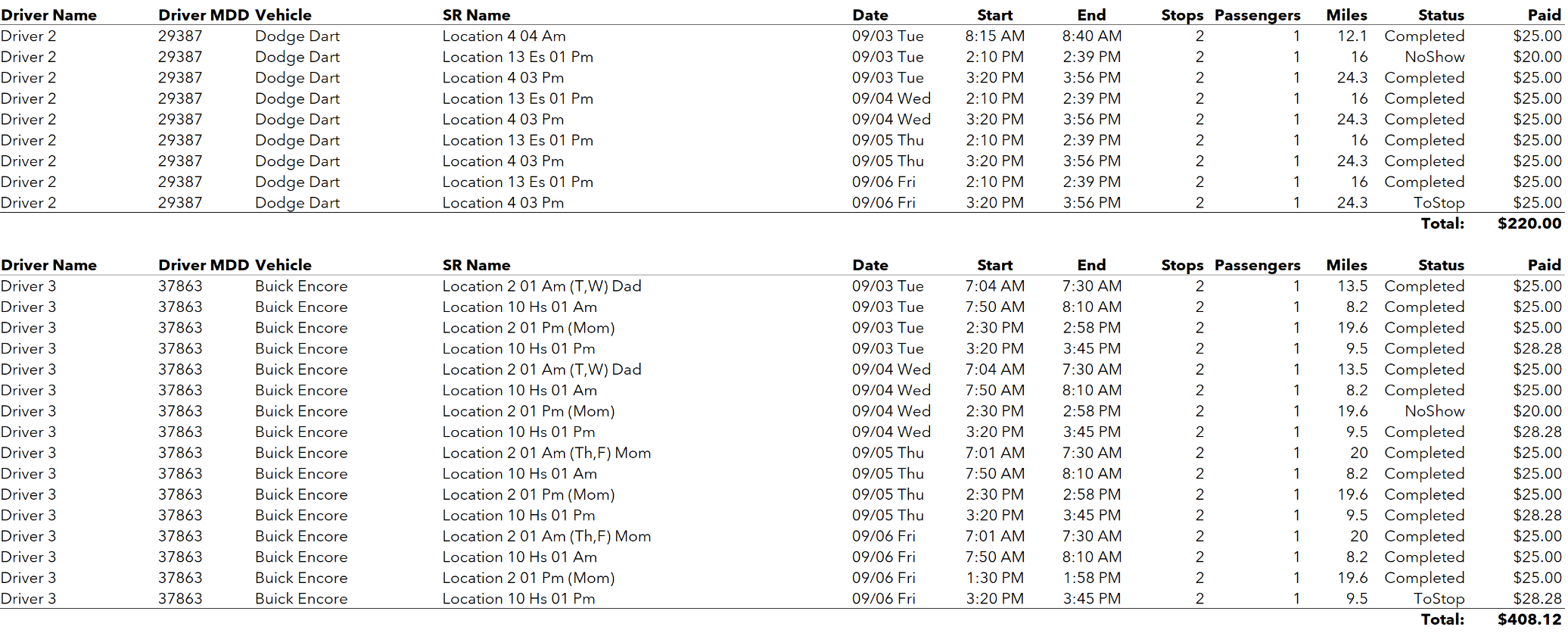
Fig. 1 — Excerpt from an auto-generated payroll report page for all drivers, built entirely from a single recursive formula.
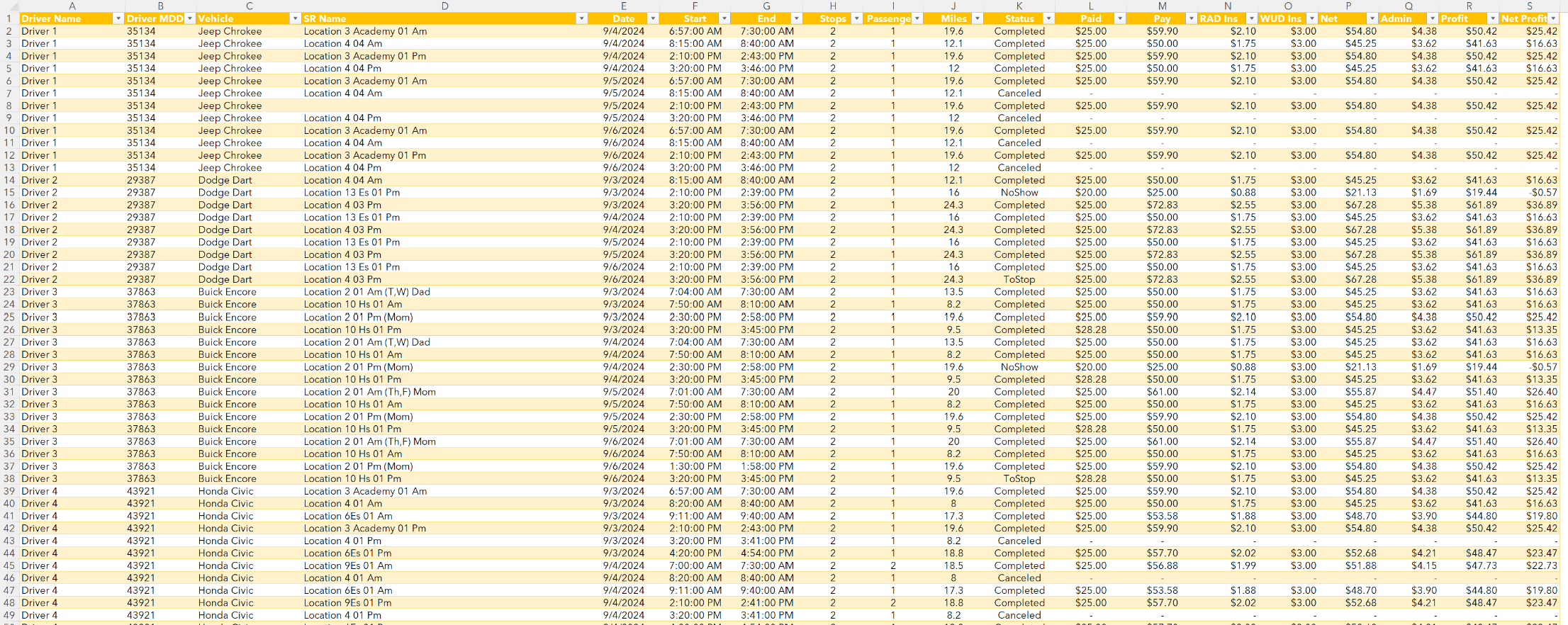
Fig. 2 — The imported weekly route data, with automated trip pricing.
What Was Built
This system has been in regular use since September 2024, verified still active as of the Gmail rewrite in August 2025.
- A payroll cycle that used to take the better part of two working days, now runs start to finish in about fifteen minutes
- A recursive formula that builds every driver's individual report and the full company report from the same underlying data, with no manual sorting
- Automatic handling of route/driver pricing exceptions, with no extra effort
- One-click PDF reports and automatic pay-summary emails to every driver, rewritten for Gmail at the client's request a year after launch
A Note on Confidentiality
This project is not covered by a Non-Disclosure Agreement. The client is described by industry only, and no company or individual names appear on this page. Any figures or screenshots shown use placeholder data. The system architecture and methodology described are accurate.