
Case Study • Financial Budgeting • Budgeting Template
Chasing numbers. Building by hand. Gone. A template that builds itself.
A self-expanding budgeting template with automated reporting for a property management portfolio, delivered in May 2026 after a sixteen-week build.
The Challenge: What does a good budget for next year actually look like? Before this project, that question rarely got asked. There wasn’t time.
The client’s budgeting template went out to properties with different numbers of divisions, development statuses, and property types, and just setting it up for a given property ate the clock before anyone typed a number. Manual entry compounded it, and exceptions and what-ifs meant the team was working for the spreadsheet instead of the other way around.
The bottom line: The tool built to save time was the thing eating it.
Structured
One template expands to fit any property’s groups and GLs. Internal and external data organized identically.
Automated
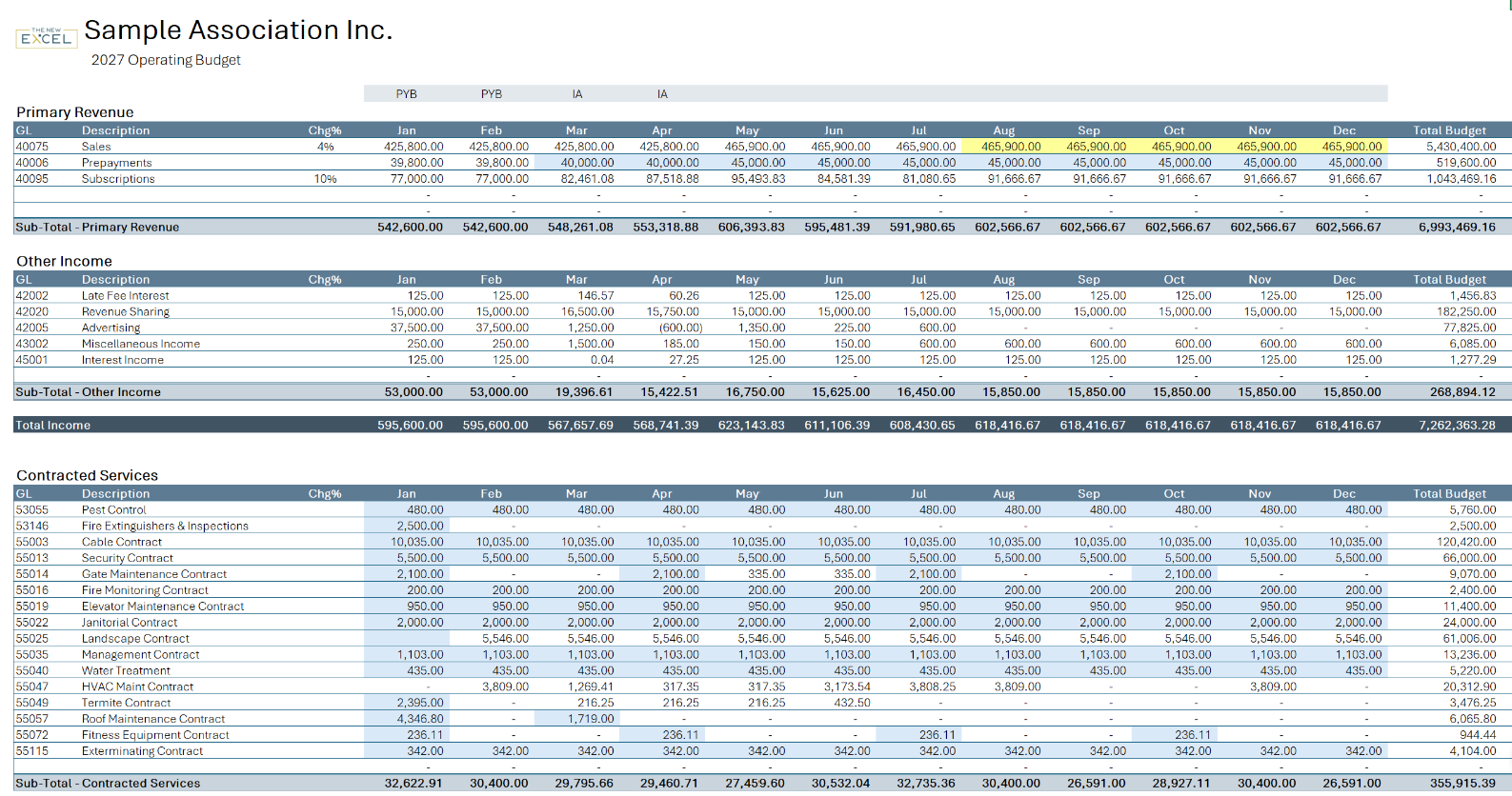
One LAMBDA formula powers every editable cell, forecasting the budget automatically.
Tailored
A hidden branch runs special-case logic for select GLs, with user overrides still available.
How I Built It
What data is needed?
Primary Data
Monthly Figures by GL
Income and expense figures by GL, from the prior cycle, current and prior actuals, and the new budget.
Metadata
Groups, Categories & Parameters
Budgeting groups, categories and their GLs, lot and fee lists, and forecast growth rate and priming source.
Where does it come from?
Primary Data
A Template That Sizes Itself
The template queries a property’s own groups, categories, and GLs, then builds itself to the exact size needed — unusual property set-ups handled automatically. No matter the property, no manual page-building is ever required.
Tailored
One Formula, Every Cell
Every editable cell runs off one BudgetCalc LAMBDA, with branches inside capable of handling unlimited GL-specific exceptions without a second formula to maintain.
Metadata
Prior Years, Automatically
Input sheets show prior and current years’ figures next to each line automatically — nothing pulled or calculated by hand.
Primary Data x Metadata
Four Matched Sources
Four identically structured Power Query sources feed the template from the client’s SQL database.
What do you need to do with it?
Reports
One Formula per Report
Recursive LAMBDA formulas pull and format whatever grouping a report needs — prior budget, prior actual, blended current, new forecast, variance.
Custom Output
New Reports, No New Code
Adding a report simply requires a new Power Query — not writing new formulas. The same report Lambda turns any similarly structured Power Query into an instant report.
Audit Tools
Built-In Reconciliation
Conditional formatting flags overrides, duplicate GLs, and anything needing reconciliation before a budget is finalized.
Export
One-Click Database Export
A finished budget exports with one click, ready for upload into the client’s SQL database.

Fig. 1 — An input sheet for creating the new budget. Every monthly cell runs off the same BudgetCalc formula, and each monthly column and GL row includes an override cell that allows the priming source or growth rate to be changed from the global, user-defined values.
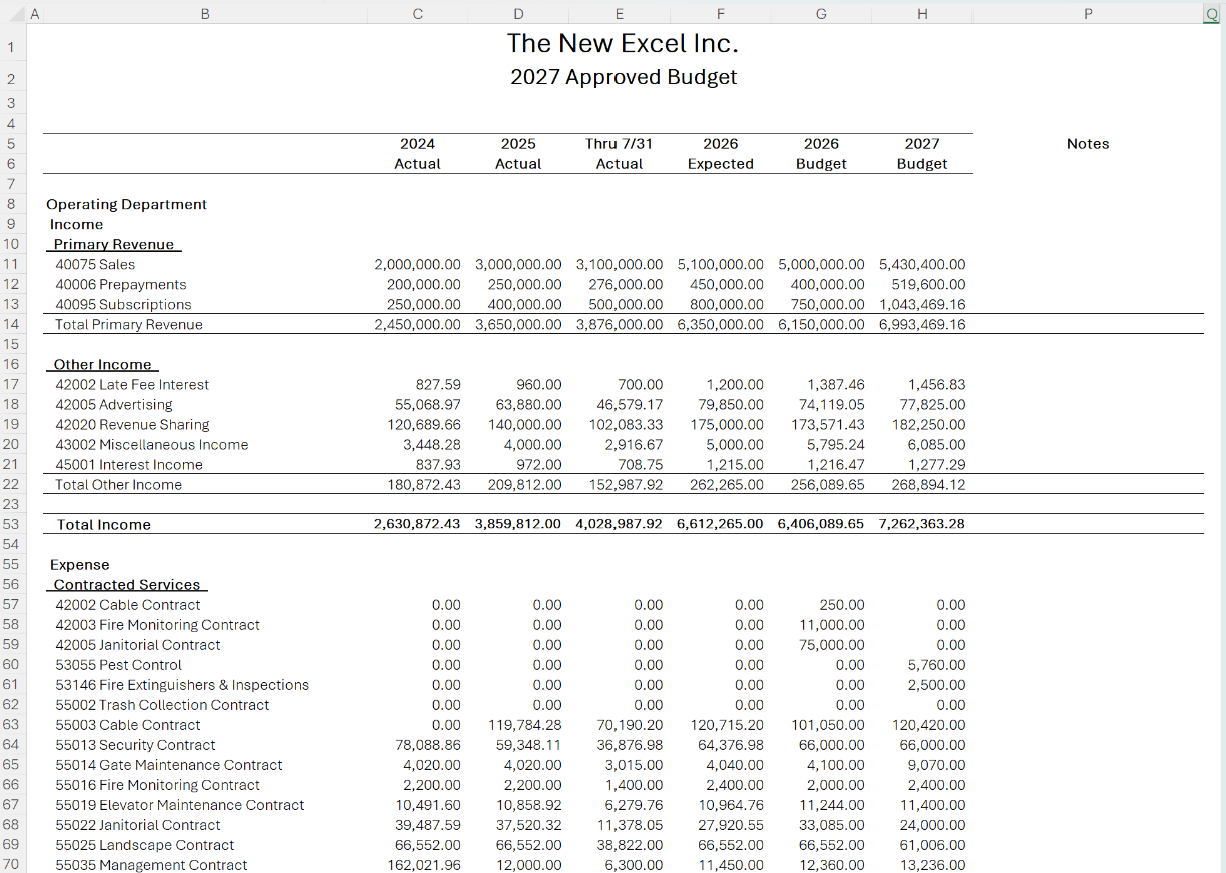
Fig. 2 — A formatted budget report, built entirely from a single formula referencing a single Power Query.
What Was Built
This system is now running the client’s actual budgeting cycle, delivered in May 2026 after a sixteen-week build, followed by eight weeks of testing.
- A template that expands itself to fit any property, no manual template-building required
- One BudgetCalc LAMBDA powering every cell, with unlimited GL-specific exceptions built in
- Four identically structured Power Query sources powering creation and reporting
- A full report suite from one shared set of recursive LAMBDA formulas
- Now in its first cycle, with positive feedback from the finance team
A Note on Confidentiality
This engagement is covered by an NDA. The client’s name, its internal business logic, and its real figures are withheld throughout; screenshots use dummy figures and generic category and GL names, with the client’s real branding replaced with The New Excel’s own. The client approved this project appearing in a portfolio.
