Case Study · Mold & Water Damage Remediation
An Auto-Expanding Field Assessment Tool
Field representatives priced storm and water damage by hand, off a paper worksheet, with no way to guarantee two representatives priced the same damage the same way.
At a Glance
Client / Sector
Confidential — residential mold and water damage remediation contractor
Engagement Type
Excel-based field assessment tool with an automated estimate and report builder
Duration
Delivered March 2024
My Role
Sole consultant — requirements, architecture, development, testing
Tools & Techniques
Excel, VBA (event macros, self-cloning worksheets, report building), recursive LAMBDA, structured Tables, data validation, conditional formatting, protected/hidden admin sheets
Key Deliverables
Field assessment workbook, centralized pricing engine, admin-delineated action items, auto-generated estimate, self-cloning room template
Structured
A hidden pricing sheet cross-references every material, its possible assessments, and required action items against category and after-hours pricing tiers, so every field entry resolves to one governed answer.
Automated
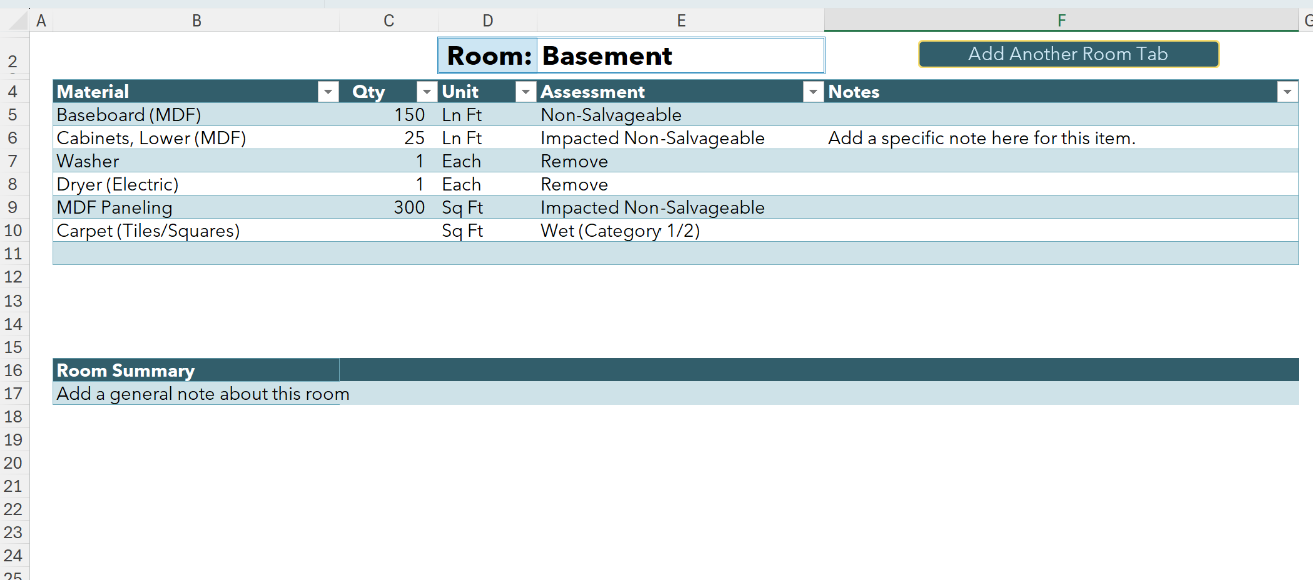
Protected Room input sheets guide and speed assessment creation by pre-filling fields the moment a material is selected. Report creation adds action items and pricing automatically, with no manual lookups.
Tailored
A single button clones an entire Room worksheet, automation included, into a fresh blank page — letting a representative add as many rooms as a job requires, without ever leaving the workbook.
The Challenge
Field representatives recorded every affected room and material on a paper worksheet during the initial site visit, then assembled pricing by hand afterward against an informal rate sheet. Damage category and after-hours status both affected the rate and the required action, distinctions a paper form had no way to enforce. There was no instant feedback for the customer, and a real risk that two representatives, or the same one on different days, priced comparable damage differently.
How It Was Built
What data is needed?
Primary data
Per-room, per-material entries — material, quantity, and assessment — logged room by room during the site visit.
Metadata and rules
A materials list with each material’s unit of measure; a pricing table defining every material’s possible assessments, categories, pricing, and required action items; dropdown lists for room names, states, and units of measure.
Where does it come from?
Hidden, admin-only Lists and Prices sheets feed every dropdown a representative sees, holding the price for every material-and-assessment combination, split by category and after-hours status.
A Job Summary tab captures customer information plus the Category and After Hours flags that filter every downstream dropdown to only the valid combinations for that job.
Selecting a material auto-fills its unit and, when only one assessment applies, the assessment itself. An event macro adds a new blank row automatically.
A button duplicates the Room tab, event macros included, as a new blank page — the workbook grows to as many rooms as the job needs.
What do you need to do with it?
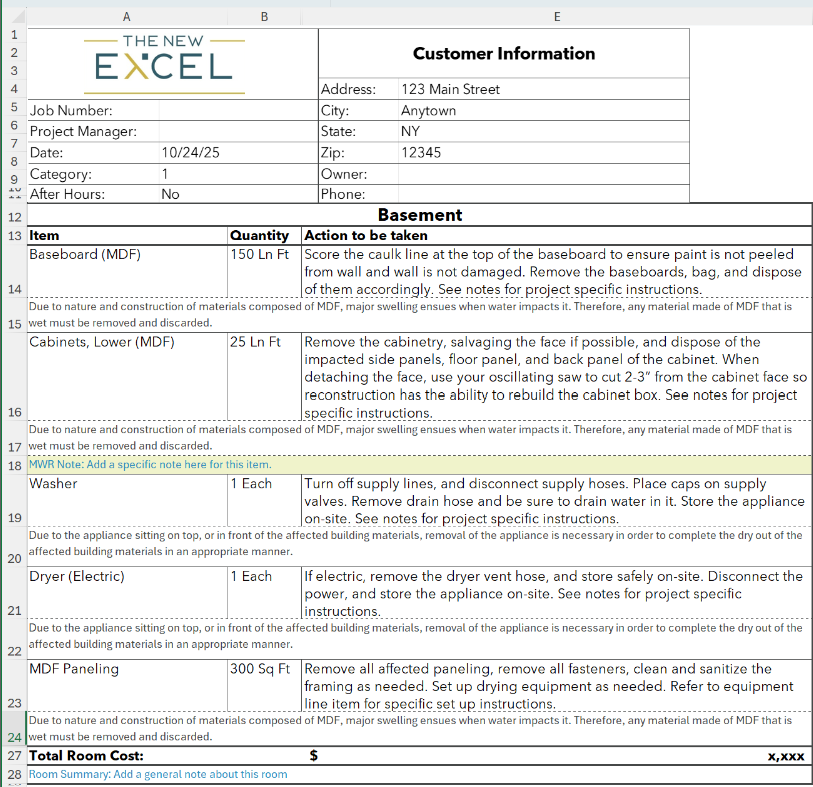
A fully formatted report renders automatically when the Report tab is selected, with room-by-room breakouts of material, quantity, and required action for every logged item.
A per-room subtotal and overall job estimate roll up from the same entries, priced as a controlled range using a variance percentage the client controls.
Header information, disclaimer text, and project-specific notes print on every report automatically.
What Was Built
This tool has been in the field since March 2024, with assessments completed entirely from dropdowns during a single site walk-through.
- A field assessment workbook a representative can complete room by room, on site, with no formula or pricing knowledge required.
- A pricing engine that resolves the correct rate and required action for every combination automatically, so quotes stay consistent across representatives and visits.
- A report and estimate that render immediately, letting a representative walk a customer through real numbers before ever leaving the site.
- A UDF-plus-recursive-LAMBDA rollup that pulls every room's line items directly off each Room tab, no Power Query or intermediate table required, paired with a VBA macro that lays out the formatted report row by row.
- An estimate built as a governed range rather than a single number, reflecting a variance percentage set on the admin pricing sheet.
A Note on Confidentiality
This project is not covered by an NDA. In the absence of documented permission to use their name, this entry withholds it and describes the client by industry only. Screenshots are real, with the company’s name and logo replaced by The New Excel’s own branding, and pricing figures withheld or replaced with placeholder values. The system architecture and methodology described are accurate.